One trade record. Every way to learn from it.

Import executions, preserve the decision around each trade, analyze the patterns, and test what changes next. Every section below marks the real Free or Pro limit.

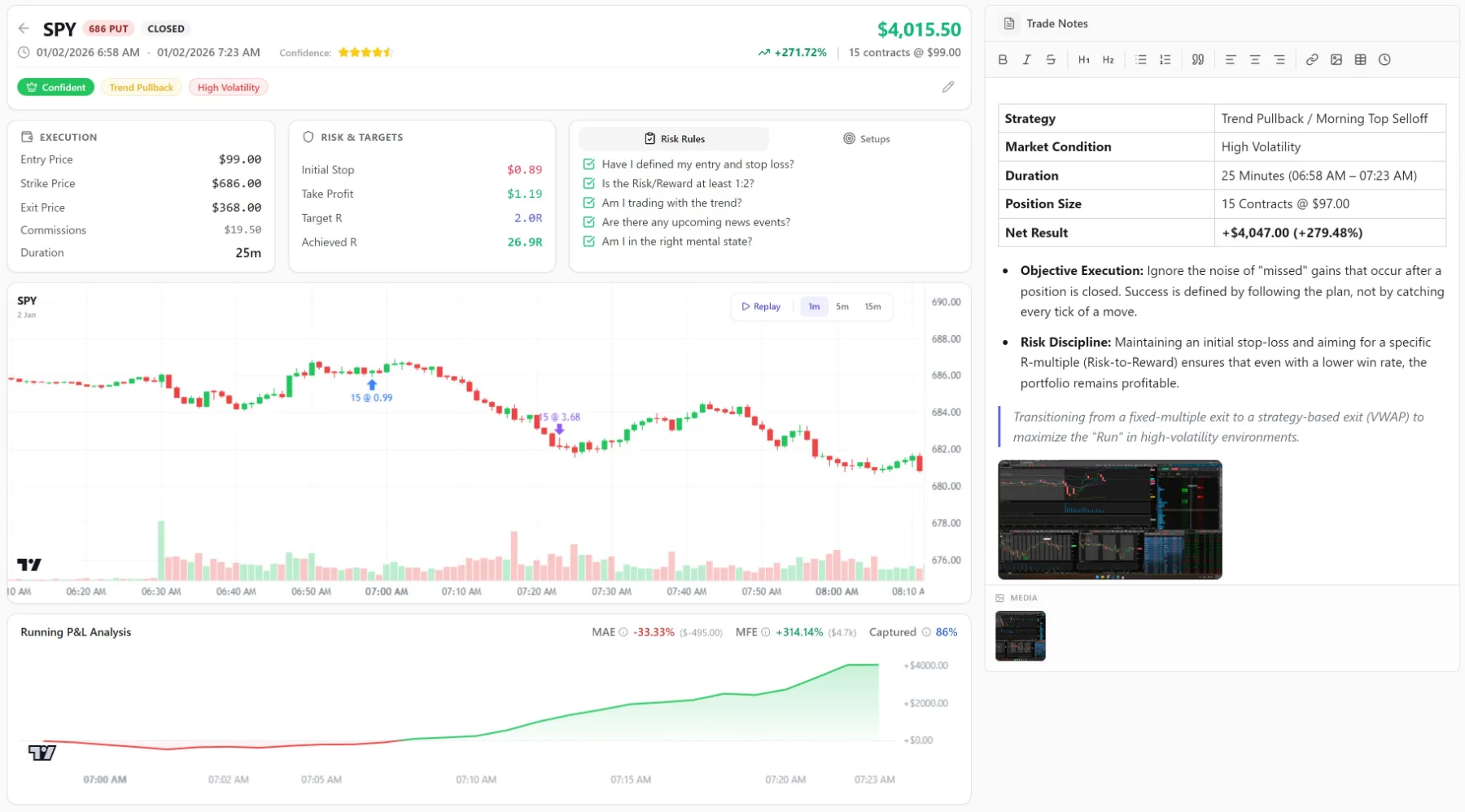
The LynxTrades trade detail page for a closed SPY put, showing execution prices, risk and targets, the risk-rule checklist, entry and exit marked on the price chart, running profit-and-loss with MAE and MFE, and the trade notes
One closed trade, whole: every fill, entry and exit on the chart, the realized result, and the note that explains it.
StocksAAPL · NVDA · SPY
OptionsSPY CALL · AAPL PUT · QQQ CALL
FuturesES · NQ · CL
ForexEURUSD · GBPUSD · USDJPY
CryptoBTC · ETH · SOL
CommoditiesXAUUSD · WTI · NATGAS

Your trades
import themselves.

Connect a supported broker and fills arrive on their own. For other accounts, upload a supported CSV export and review the AI-generated mapping before import.

Pro
80+ brokers and prop firmsFinatic, SnapTrade, MetaTrader 4/5, cTrader, Tradovate
Pro
AI CSV importSupported CSV exports, with unfamiliar columns mapped for review
Six asset classesStocks, options, futures, forex, crypto, commodities
Multi-leg option strategies10+ presets, strategy detected from the legs
Scaling in and outEvery partial fill kept, never averaged away
Cash, margin, IRA and paperRetail or prop firm, in any currency
Transaction ledgerDeposits, withdrawals and a running balance
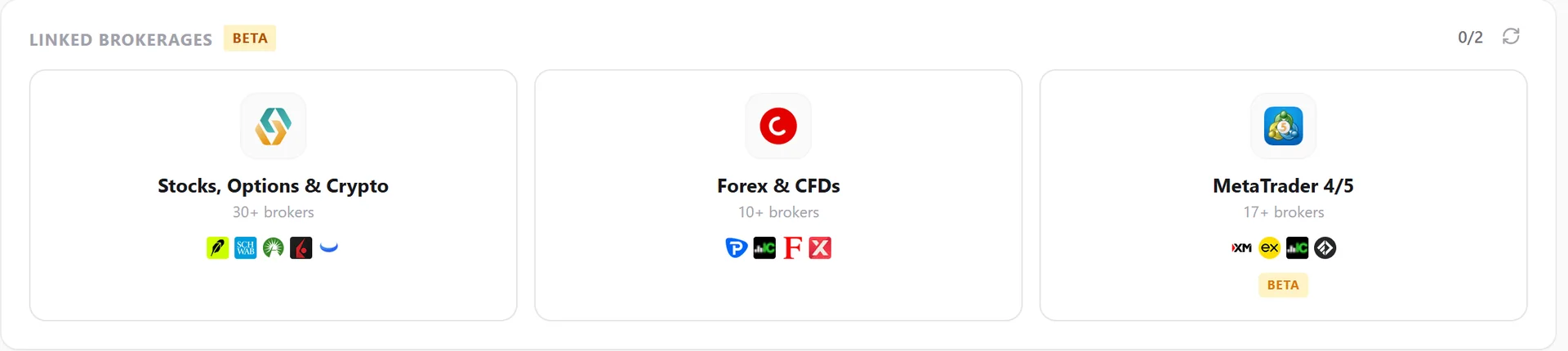
The LynxTrades connection screen with Broker Sync, cTrader, MetaTrader, Tradovate and CSV import options
Choose Broker Sync, cTrader, MetaTrader, Tradovate, or a CSV import from the same connection screen.

Every broker in the connection picker.

Browse every brokerage and platform available for read-only sync today. This directory stays current with the in-app connection picker.

Broker Sync

Stocks, options, crypto and futures

35 listed
  • Wealthsimplewealthsimple.com
  • Robinhoodrobinhood.com
  • Fidelityfidelity.com
  • Schwabschwab.com
  • Webull USwebull.com
  • Webull Canadawebull.ca
  • Trading212trading212.com
  • Trading212 Practicetrading212.com
  • DEGIROdegiro.com
  • E*Tradeetrade.com
  • Questradequestrade.com
  • Interactive Brokersinteractivebrokers.com
  • Alpacaalpaca.markets
  • Alpaca Paperalpaca.markets
  • Publicpublic.com
  • tastytradetastytrade.com
  • Tradovatetradovate.com
  • NinjaTraderninjatrader.com
  • TradeStationtradestation.com
  • eToroetoro.com
  • Zerodhazerodha.com
  • Stake Australiahellostake.com
  • Coinbasecoinbase.com
  • CommSeccommsec.com.au
  • Vanguard USvanguard.com
  • Binancebinance.com
  • Krakenkraken.com
  • Buxgetbux.com
  • AJ Bellajbell.com
  • Chasechase.com
  • Empowerempower.com
  • Moomoomoomoo.com
  • TD Direct Investingtd.com
  • Upstoxupstox.com
  • Wells Fargowellsfargo.com

thinkorswim accounts connect through Schwab.
cTrader

Forex and CFD broker connections

16 listed
  • Pepperstonepepperstone.com
  • IC Marketsicmarkets.com
  • FxProfxpro.com
  • Axiaxi.com
  • FP Marketsfpmarkets.com
  • RoboForexroboforex.com
  • OctaFXoctafx.com
  • Skillingskilling.com
  • Tradeviewtradeviewmarkets.com
  • Erranteerrante.com
  • Eightcapeightcap.com
  • Vantagevantagemarkets.com
  • Tickmilltickmill.com
  • HFMhfm.com
  • BlackBull Marketsblackbull.com
  • FXTMforextime.com

Any broker available through the cTrader platform can connect.

MetaTrader 4/5

Retail brokers and prop firms

34 listed
  • IC Marketsicmarkets.com
  • Pepperstonepepperstone.com
  • XMxm.com
  • Exnessexness.com
  • FBSfbs.com
  • OANDAoanda.com
  • FXCMfxcm.com
  • Tickmilltickmill.com
  • FP Marketsfpmarkets.com
  • Axiaxi.com
  • RoboForexroboforex.com
  • Admiralsadmirals.com
  • HFMhfm.com
  • Vantagevantagemarkets.com
  • FXTMforextime.com
  • ThinkMarketsthinkmarkets.com
  • Eightcapeightcap.com
  • BlackBull Marketsblackbull.com
  • Derivderiv.com
  • Alparialpari.com
  • FTMOftmo.com
  • The Funded Traderthefundedtrader.com
  • E8 Fundinge8funding.com
  • FundedNextfundednext.com
  • The 5%ersthe5ers.com
  • Funded Trading Plusfundedtradingplus.com
  • Alpha Capital Groupalphacapitalgroup.uk
  • City Traders Imperiumcitytradersimperium.com
  • FXIFYfxify.com
  • Funding Pipsfundingpips.com
  • Goat Funded Tradergoatfundedtrader.com
  • Blue Guardianblueguardian.com
  • Lux Trading Firmluxtradingfirm.com
  • MyFundedFXmyfundedfx.com

Any MT4/MT5-compatible broker or prop firm can connect. Requires the Finatic connector EA running on your MetaTrader terminal.

One trade,
opened all the way up.

A fill is more than a row. Keep executions, risk plans, entry and exit markers, and notes in one record; supported symbols also include historical price context.

Price context at entry and exitHistorical candles appear where symbol data is supported
Stop, target R and achieved RPlanned risk against what the trade actually did
The checklist you keptRecorded per trade, at the moment of entry
Emotion tagsTagged at entry, matched against the result
Mistake categoriesYour own labels, and what each one costs you
A note attached to the fillWritten while it is still accurate
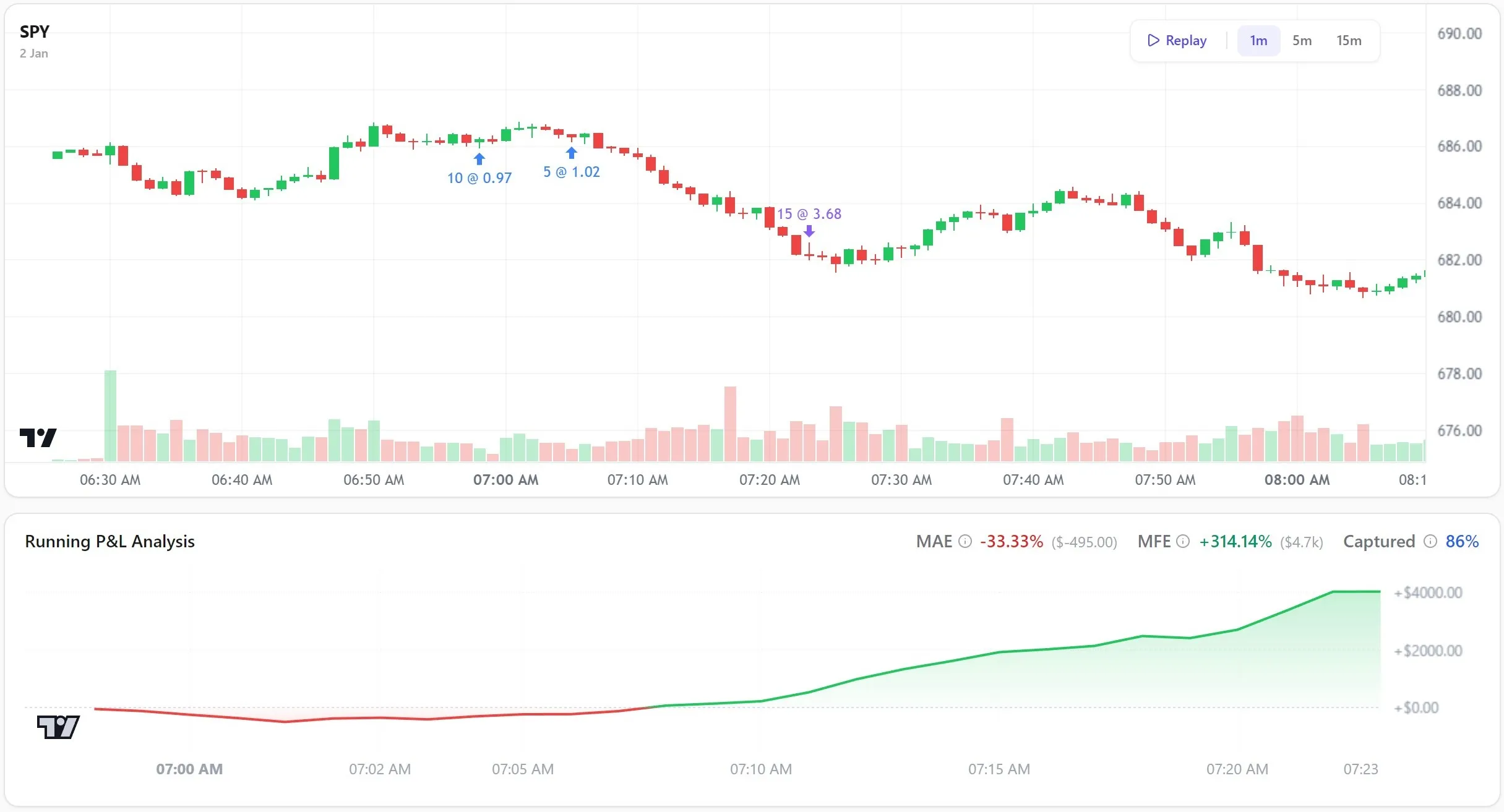
A LynxTrades SPY chart showing real candles, scaled entries and an exit above the running profit and loss path
Real candles, entry and exit markers, and the running P&L path for one trade.

Which setup pays,
which hour costs you.

Expectancy is not one number. It is a surface with a shape, and the shape is where the money is going.

Equity curve and drawdown
Win rate, expectancy, R-multiples
BreakdownsBy setup, symbol, session, hold time and emotion
Pro
Best-times heatmapYour P&L by day and hour
Pro
MAE / MFE excursionHow much of the move you actually kept
Pro
Live-quote intraday P&LSupported open positions; no multi-leg options, and futures require symbol mapping
Pro
Discipline scoreYour own risk rules, checked automatically against every closed trade
Pro
Benchmark alphaYour curve against SPY: alpha, beta and information ratio
CalendarDay, week and month P&L
Reports and exportPDF reports, trade CSV and per-account structured JSON
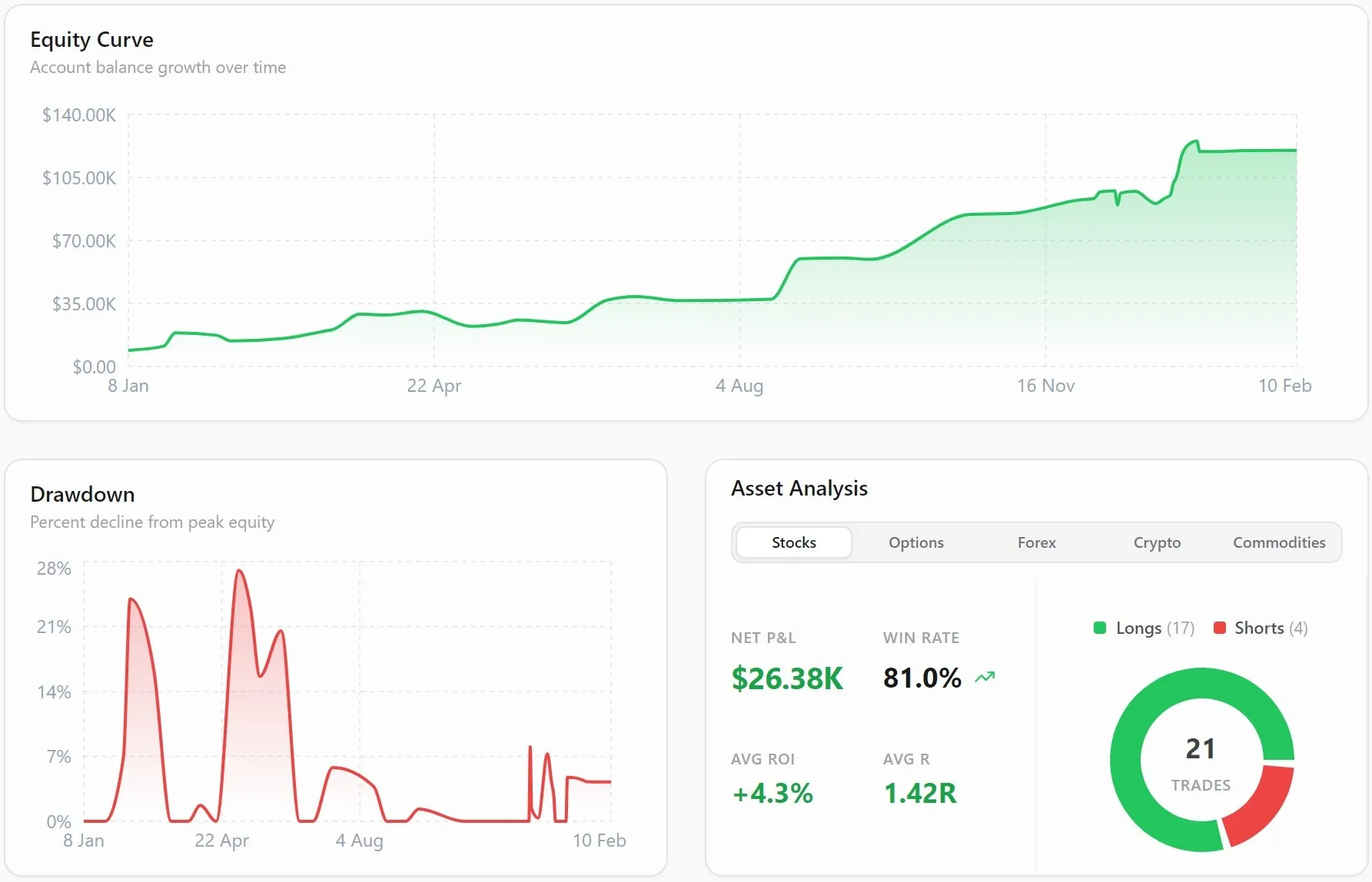
The LynxTrades analytics page with performance stat cards above an equity curve, monthly P&L bars and a drawdown chart
Stat cards, equity curve, monthly distribution and drawdown in one view.
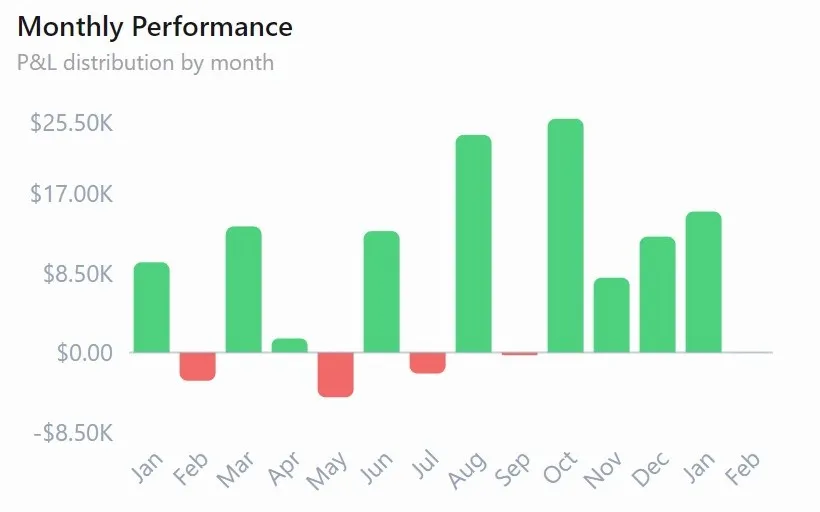
Monthly performance breakdown in LynxTrades
Per-month performance, so a bad quarter is a date range rather than a feeling.
The LynxTrades best-times heatmap showing profit and loss by weekday and trading hour
The best-times heatmap makes profitable and costly trading windows visible by day and hour.

Test the change
before you risk it.

Resample your own history, move one variable, and see the distribution of outcomes rather than a single flattering line.

Pro
Monte CarloUp to 10,000 resampled runs
Pro
Visible Kelly criterionFull, half and quarter Kelly percentages shown in risk analytics
Pro
What-if sandboxMove one number and watch the curve move
Simulated replayRun the session again, candle by candle
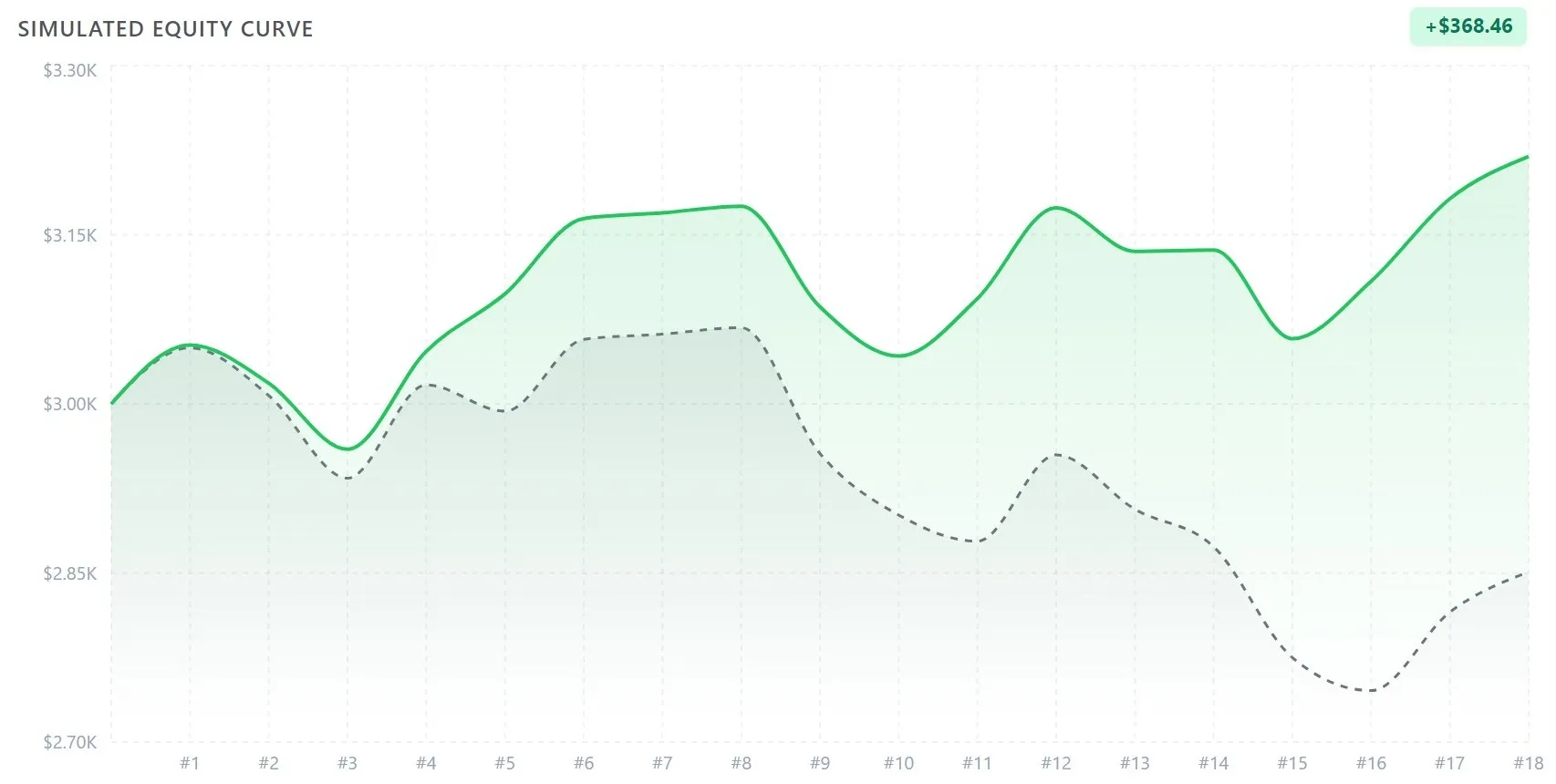
TRADE 1TRADE 28MEDIAN PATH
Resampled equity paths, with the median drawn solid.
A simulated equity curve over 18 trades drawn as a solid line above the dashed line of the original results
The what-if curve against the original, so the difference is a number and not an argument.

Revisit the trade,
candle by candle.

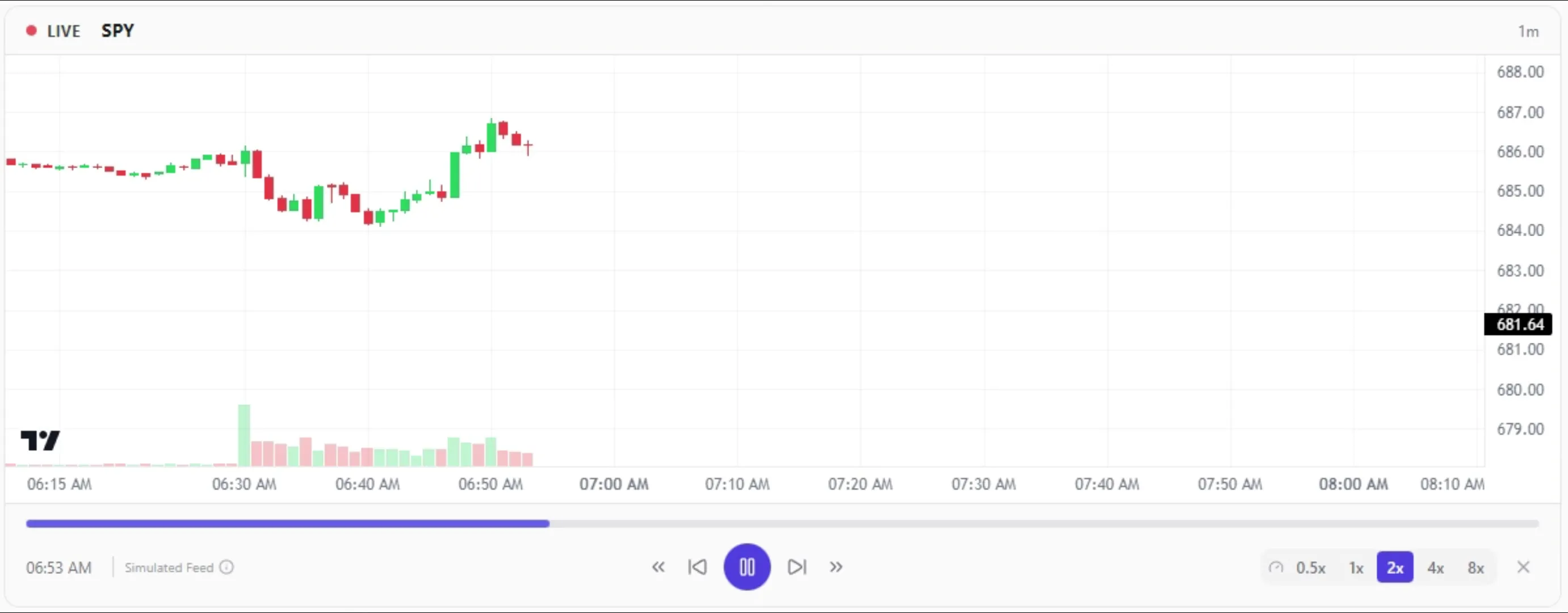
For supported symbols, play the session back at the pace you need. Entry and exit markers arrive in sequence, helping you review the decision with the information available at the time.

Candle-by-candle playbackReview supported historical bar data around entry and exit
Smooth intra-candle movementA simulated feed between historical bars
Adjustable speedSlow the decision down or move quickly through context
Seek to any momentJump along the timeline without restarting
Dynamic trade markersEntry and exit appear when playback reaches them
One-click chart switchMove between the static chart and replay
A still frame of LynxTrades trade replay before playback begins
Historical candles replay with speed, seek, and trade markers appearing in sequence.

Simulated movement between historical bars; clearly labelled throughout playback.

Your evaluation,
tracked while it is live.

Track phase, day count, target progress and drawdown against an editable firm preset or your own rules, on both plans. Pro adds the command center: room left today, consistency headroom, a pre-trade planner and pass odds. Verify current limits with your firm.

Eight firm presets plus customTwo FTMO, two The5ers, TopStep, Funded Trader, MyForexFunds and Apex configurations
Three drawdown typesStatic, trailing and end-of-day trailing, each measured the way the firm measures it
Four phasesEvaluation 1–3 and funded
Evaluation limitsDaily loss, max loss, minimum trading days and consistency
Pro
Room todayThe most you can lose before a breach, across both limits at once
Pro
Consistency headroomBest-day share under your firm’s own denominator, and what you can still book today
Pro
Pre-trade plannerIf I take this size, where does my floor land
Pro
Pass probabilityResampled from your own daily results, at four position sizes
Phase 1 · Evaluation
+$3,240
Day 7 · Target progress 64.8%
2.1%Max DD used
5Min days done
ClearDaily loss
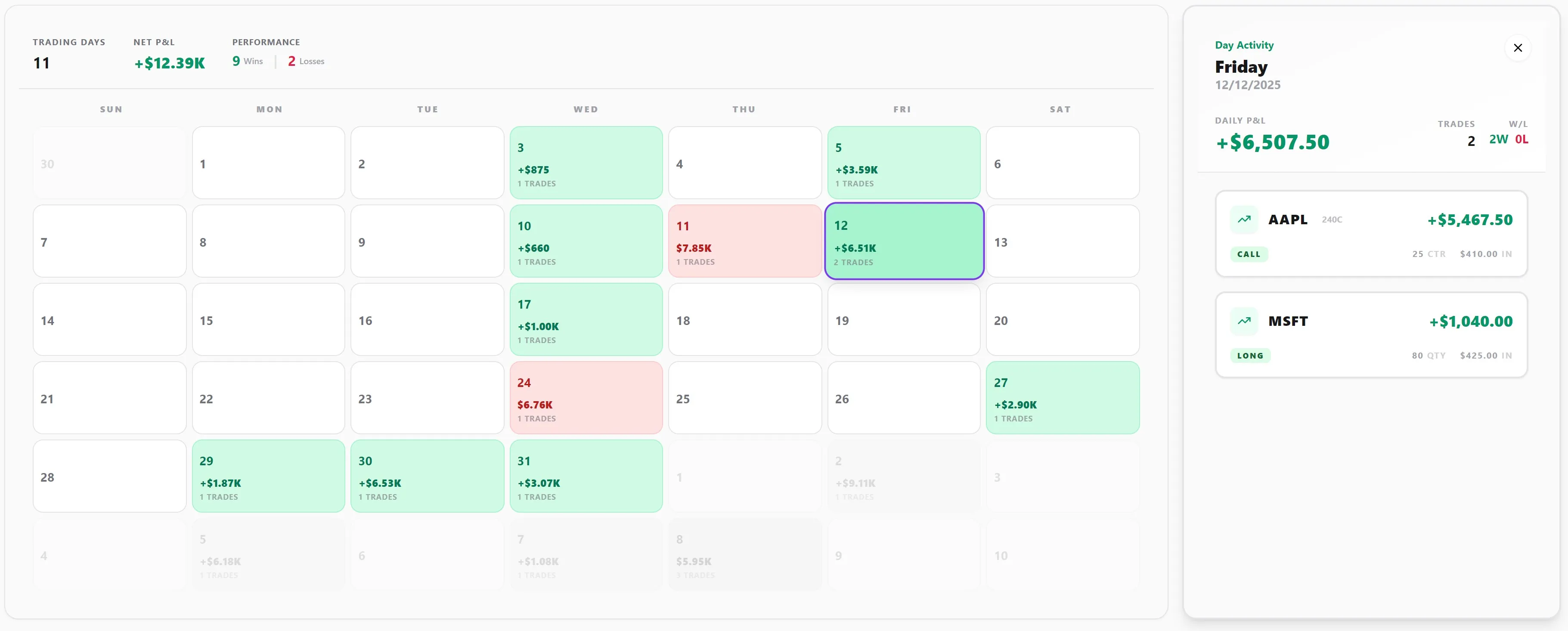
The LynxTrades monthly calendar showing daily profit and loss, trading-day activity and the trades for a selected day
Daily P&L, trading-day activity, and every trade behind the total.

Write it down
while it is still true.

A journal that links to the trades it explains, a playbook library that keeps score, and a calendar you can drill into a single day.

Rich-text journalTemplates, collections, tables, code and images
Pro
YouTube embedsThe clip plays inside the note
Setups and playbooksUnlimited, with per-setup performance
Tags and mistakesUnlimited, and each one is measurable
Calendar reviewDrill from a month into a single day
Export wheneverTrade CSV or per-account structured JSON; no media, settings or connections
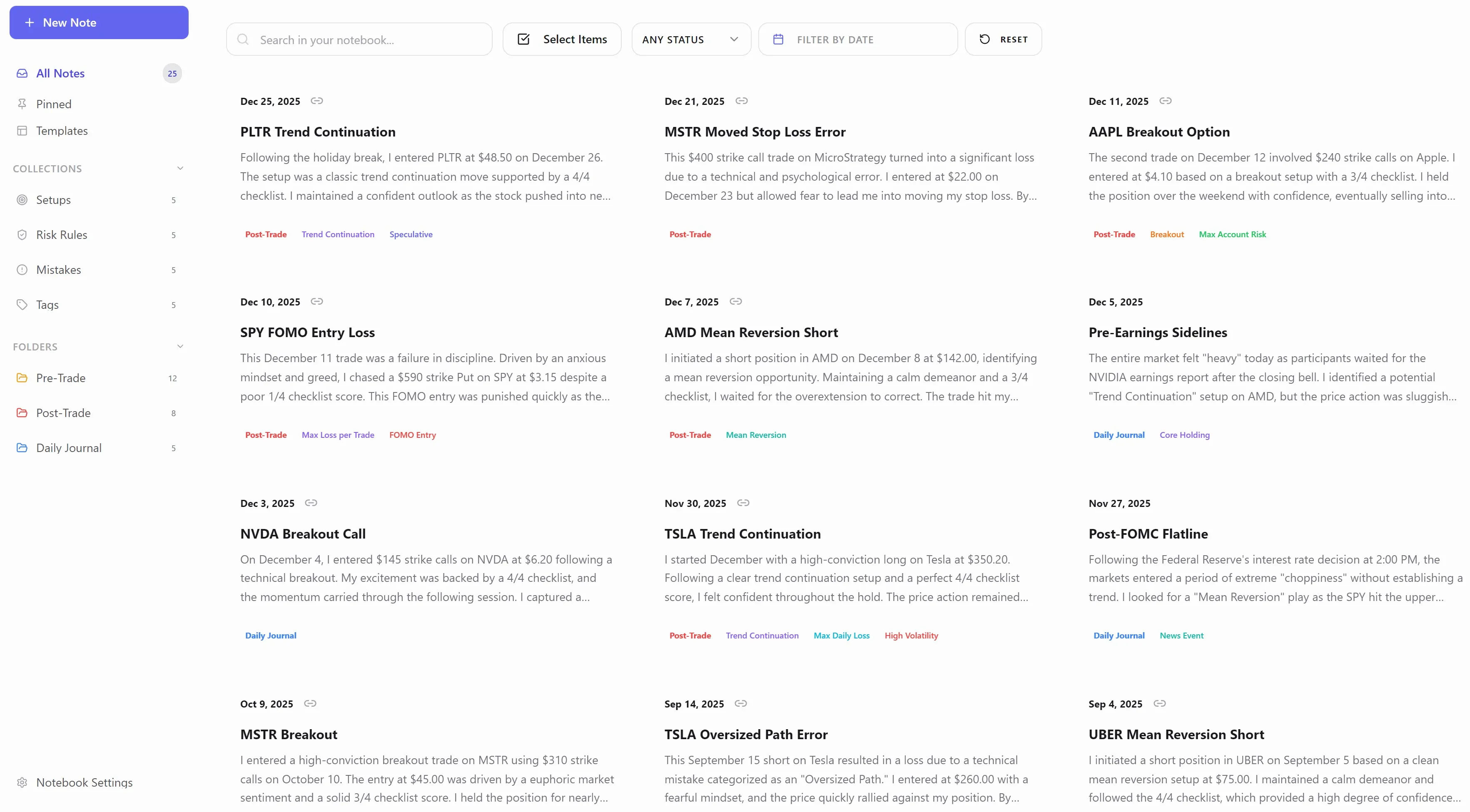
The LynxTrades notebook showing searchable trading plans, post-trade reviews, linked trades and tags
A searchable notebook keeps plans, reviews, linked trades, and recurring observations together.
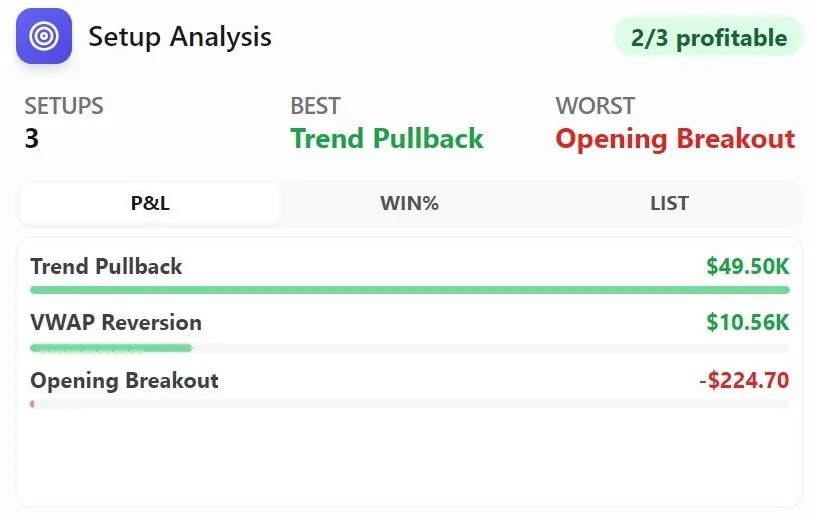
LynxTrades setup analysis comparing profit and loss across Trend Pullback, VWAP Reversion and Opening Breakout playbooks
Setup performance makes the strongest and weakest playbooks immediately visible.

A month, ready to review

December 2025 in depth: every active date, each week’s running total, and the selected Dec 27 PLTR review.

Review your week.
Share it if you want.

Each week LynxTrades writes a review of your trading and delivers it on the schedule you set, with an archive that grows behind it. When your results are worth showing, publish a frozen snapshot at its own link and control exactly what it reveals. Both are Pro.

Weekly reviewSUNDAY · 18:00 · YOUR TIMEZONE

A green week that almost wasn’t.

NET
+$1,284 across 11 trades
BEST
Tuesday, +$918
WORST
NVDA short, -$402
“Forced the second entry after the stop. Knew it at the time.”Wednesday, from your journal

One change for next week: stop re-entering a level that has already failed once.

Built from your trades and journal entries. Arrives by email if you want it.

Shared reportRead-only
lynxtrades.com/s/7hq2k9…
  • Password
  • Expires in 30 days
  • Amounts hidden

The snapshot is frozen when you create it. Editing your journal afterwards changes nothing a reader sees, and revoking kills the link on the spot.

Revoke link

Password, expiry and amount redaction are all optional. Revoking is not undoable by the reader.

An assistant that
reviews your recent data.

Onyx Q&A uses recent trades and derived analytics as context. It can link referenced trades back to their records, but it is not a market oracle and does not have opinions about your positions.

Onyx chat3 messages on Free, 200 a day on Pro
Pro
Trade assistantCurrent symbol, setup and emotion supplied as prompt context
Pro
Performance reviewsAny period, on demand
Pro
Journal coachingPrompts and drafts when you stall
Pro
News feedOnly the symbols you actually trade
Pro
Daily briefOne card each morning
Pro
Linked trade referencesSpecific trades can link back to their journal records

Onyx Q&A does not automatically include your complete trade history or every note. Its output is informational, may contain errors, and is not investment advice.

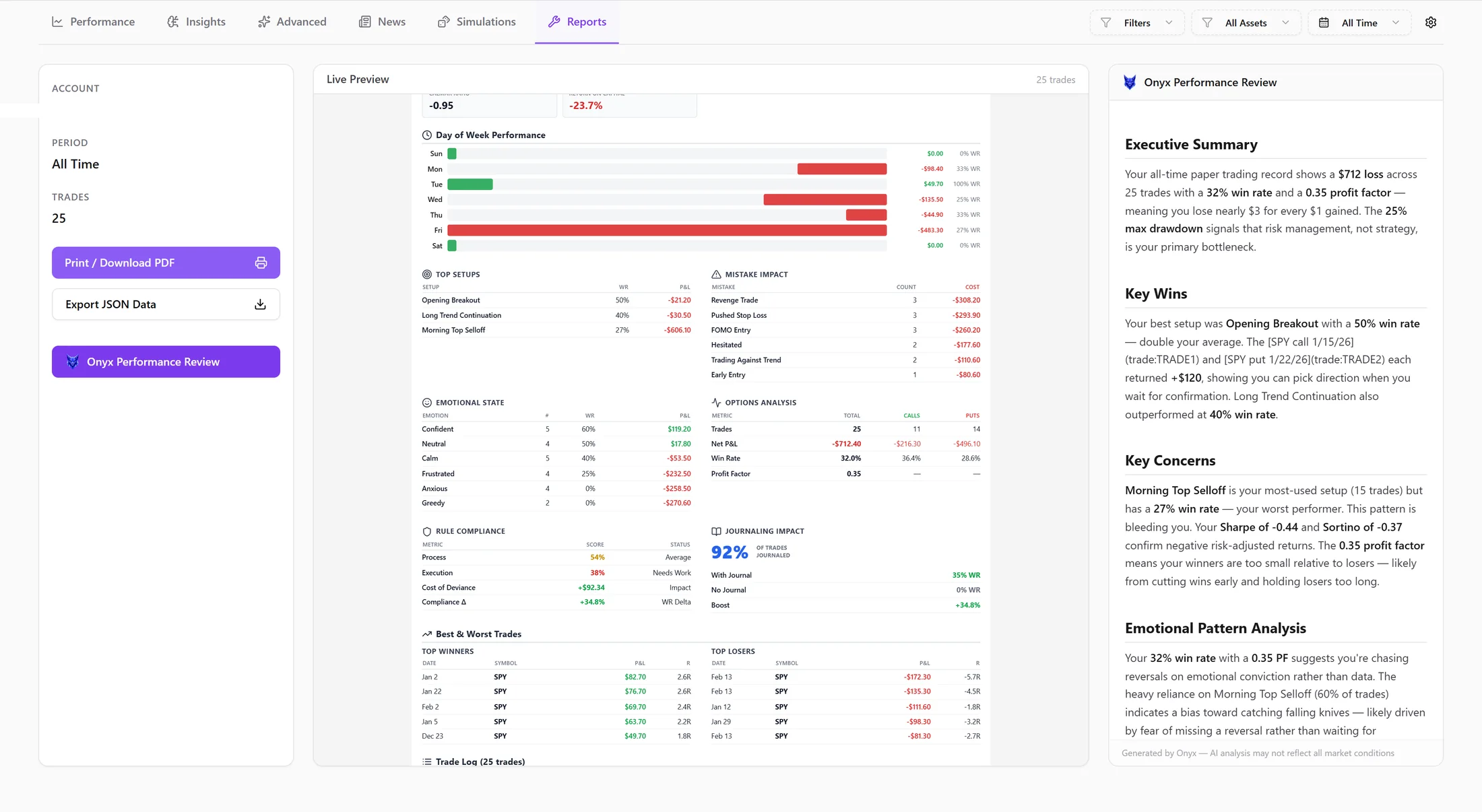
An Onyx AI performance review in LynxTrades drawn from recent trade data and derived analytics
Onyx turns a selected period into a structured review using recent trades and derived performance metrics.

The free plan
is the whole journal.

Trade and setup creation have no plan-level cap, and prop firm tracking and the core analytics dashboard are included at $0. Pro adds broker sync, advanced analytics, simulation tools, the prop firm command center, weekly reviews, shareable reports and higher Onyx limits for $13.33 a month, billed $160 annually.

No card required · Export anytime

  1. LynxTrades is a self-directed trade journal and analytics service. LynxTrades is not a broker-dealer, investment adviser, commodity trading advisor or financial institution, and does not provide financial, investment, legal or tax advice.
  2. Nothing in the product, on this website or in a message generated by LynxTrades is an offer, solicitation or recommendation to buy, sell or hold any security, derivative, currency, commodity or other financial instrument. You remain solely responsible for every trading decision.
  3. Trading involves substantial risk of loss and is not suitable for every investor. You may lose some or all of the capital you commit. Past performance recorded in a journal does not guarantee or predict future results.
  4. Analytics, statistics and reports are calculated from information supplied by you or connected third parties. They may contain errors, omissions or delays and should be reconciled with your broker’s official statements before you rely on them.
  5. Hypothetical results, simulations and projections have inherent limitations, do not represent actual trading and may differ materially from real outcomes. They cannot account for every market condition, cost, execution constraint or decision a trader may face.
  6. Onyx and other AI-assisted features produce informational output from the context available to them. Responses may be inaccurate or incomplete and should be independently reviewed; they are not personalized investment advice.
  7. Broker connections are read-only and may be operated by third-party connectivity providers. LynxTrades does not place, route, modify or cancel orders, cannot move funds and does not take custody of customer assets.
  8. Market and brokerage data may be supplied by third parties and can be delayed, incomplete or inaccurate. It is provided for journaling and review, not for live order execution.
  9. Sample ledgers, charts, statistics and product images on this site use fictional demonstration data from illustrative accounts. They are not customer results, testimonials or a representation of results any user should expect.
  10. Subscription payments are processed by Stripe on hosted payment pages. LynxTrades does not store full payment-card numbers; billing terms presented at checkout and the Terms of Service govern paid subscriptions.

© 2026 LynxTrades. All rights reserved.